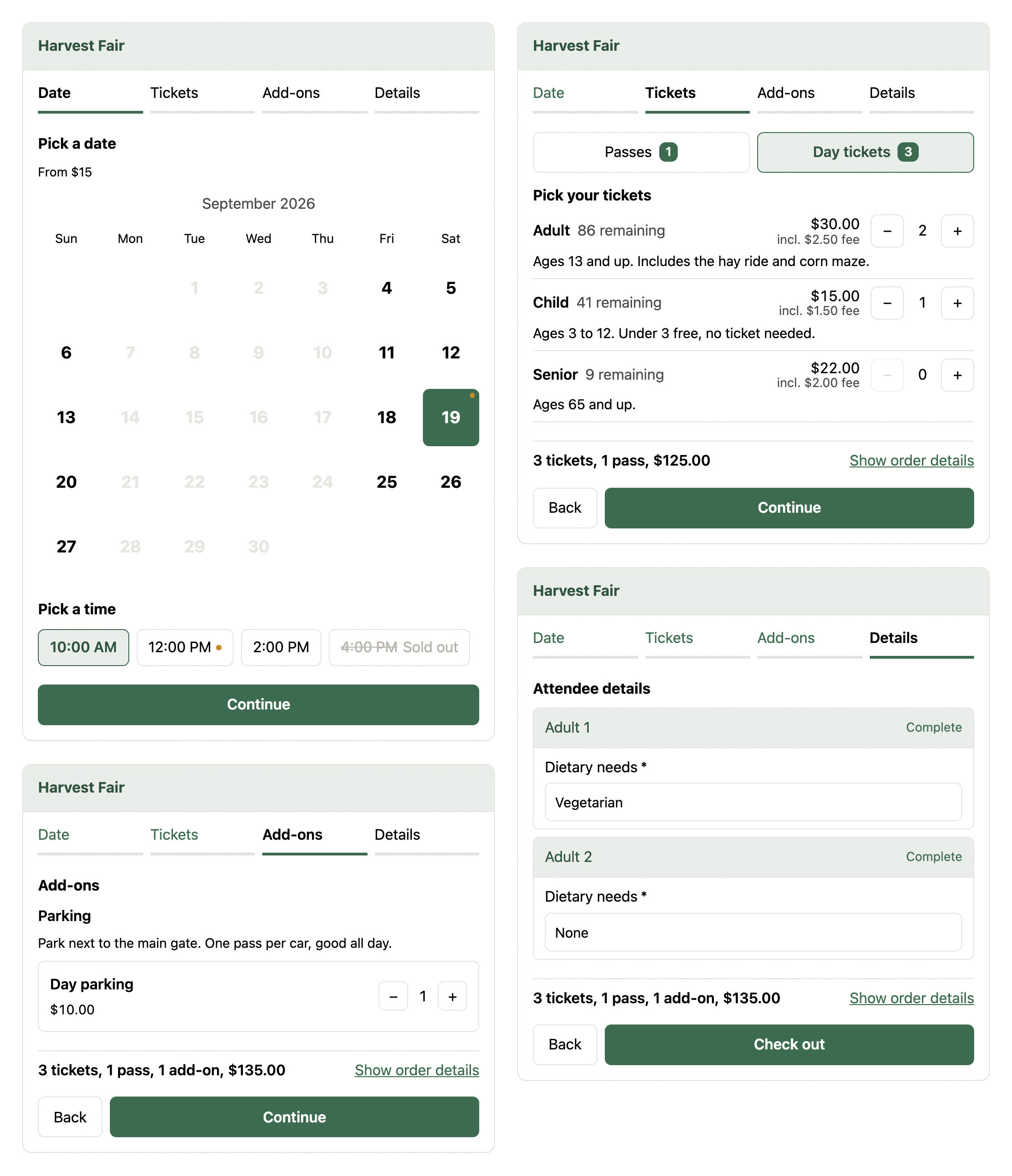
Add the Ticket picker to an event’s product page in place of the theme’s buy buttons. Each step shows only when your event needs it, so a single-date event with no add-ons or questions fits on one screen.
Where to find it
In Shopify admin, open your theme editor, go to a product template and add the Ticket picker app block.
How it works
- Steps: buyers move through Date, Tickets, Add-ons and Details, with Continue between steps and Check out at the end.
- Dates and times: events with many dates get a month grid, and events with a few get a compact row of dates. You can change this with Date picker style.
- Add-ons: offers with Ticket picker turned on show on the Add-ons step, matched to the date the buyer picked.
- Questions: your attendee and buyer questions are asked on the Details step, before checkout.
- Settings: pick an Accent color, send buyers to Checkout or Cart, and show how many tickets are left.
The Ticket picker is on every plan. Add-ons on the Ticket picker need Offers, on the Advanced plan and up.