<?xml version="1.0" encoding="utf-8"?><feed xmlns="http://www.w3.org/2005/Atom" xml:lang="en"><generator uri="https://jekyllrb.com/" version="4.3.4">Jekyll</generator><link href="https://www.guestmanager.com/feed.xml" rel="self" type="application/atom+xml" /><link href="https://www.guestmanager.com/" rel="alternate" type="text/html" hreflang="en" /><updated>2025-08-20T17:10:25+00:00</updated><id>https://www.guestmanager.com/feed.xml</id><title type="html">Guest Manager</title><subtitle>Event Check In And Ticket Scanning App</subtitle><author><name>guestmanager</name></author><entry><title type="html">Performance and design updates</title><link href="https://www.guestmanager.com/blog/product/2021/01/31/performance-and-design-update" rel="alternate" type="text/html" title="Performance and design updates" /><published>2021-01-31T00:20:00+00:00</published><updated>2021-01-31T00:20:00+00:00</updated><id>https://www.guestmanager.com/blog/product/2021/01/31/performance-and-design-update</id><content type="html" xml:base="https://www.guestmanager.com/blog/product/2021/01/31/performance-and-design-update"><![CDATA[<p>With things on the quieter side this winter, a lot of updates have been made around performance, scalability, and reliability in preparation for a big 2021.</p>

<h3 id="amazon-eventbridge-integration">Amazon EventBridge Integration</h3>

<p>Shopify now sends all webhook payloads directly via Amazon EventBridge, and are processed by a Serverless lambda function, as opposed to HTTP webhooks previously. This means:</p>

<ul>
  <li>Faster processing of new order data</li>
  <li>More reliable processing of new order data (fewer duplicate and/or missing webhooks)</li>
  <li>Much more scalable and will be able to handle large rapid bursts of new orders without scaling up new servers (flash sales, etc)</li>
</ul>

<p>Resources to learn more about Shopify + AWS Event Bridge:</p>

<ul>
  <li><a href="https://shopify.dev/tutorials/manage-webhook-events-with-eventbridge">https://shopify.dev/tutorials/manage-webhook-events-with-eventbridge</a></li>
  <li><a href="https://shopify.dev/changelog/amazon-s-eventbridge-integration-now-available">https://shopify.dev/changelog/amazon-s-eventbridge-integration-now-available</a></li>
  <li><a href="https://www.shopify.com/partners/blog/shopify-eventbridge-integration">https://www.shopify.com/partners/blog/shopify-eventbridge-integration</a></li>
</ul>

<h3 id="updated-shopify-app-interface">Updated Shopify app interface</h3>

<p>The <a href="https://polaris.shopify.com/">Shopify Polaris library</a> has been <a href="https://polaris.shopify.com/whats-new/whats-new#navigation">updated</a> to the recently released version 6, which brings the overall app interface in line with the new Shopify admin design style.</p>

<h3 id="performance-improvements">Performance improvements</h3>

<ul>
  <li>Creating and updating large multi-date events <strong>10x improvement</strong></li>
  <li>Loading tickets on the confirmation page <strong>25x improvement</strong></li>
</ul>

<h3 id="internal-app-updates">Internal app updates</h3>

<ul>
  <li>Rails 6.1</li>
  <li>Ruby 3</li>
  <li>Shopify API version 2021-01</li>
  <li>Removed 2 major dependencies that haven’t seen updates in a while</li>
  <li>Enhanced DataDog server monitoring and alerting</li>
</ul>

<h3 id="coming-up">Coming up</h3>

<p>Recurring events are next on the list!</p>]]></content><author><name>Jeff Blake</name></author><category term="product" /><category term="shopify" /><summary type="html"><![CDATA[With things on the quieter side this winter, a lot of updates have been made around performance, scalability, and reliability in preparation for a big 2021.]]></summary></entry><entry><title type="html">Collect your own booking and service fees on Shopify!</title><link href="https://www.guestmanager.com/blog/product/2020/12/20/booking-fees" rel="alternate" type="text/html" title="Collect your own booking and service fees on Shopify!" /><published>2020-12-20T00:20:00+00:00</published><updated>2020-12-20T00:20:00+00:00</updated><id>https://www.guestmanager.com/blog/product/2020/12/20/booking-fees</id><content type="html" xml:base="https://www.guestmanager.com/blog/product/2020/12/20/booking-fees"><![CDATA[<p>It’s been awhile since the last update, but believe me, things are happening! The past month or so has been devoted to improving app reliability and performance for our largest Shopify Plus customers. It’s with great satisfaction to report the app is more reliable and fast than ever. With those improvements out of the way, it’s time for some new features:</p>
<h3 id="collect-your-own-booking-and-service-fees">Collect your own booking and service fees</h3>

<p><img src="/assets/images/blog/image-20201220140424467.png" alt="Collect your own ticket service fees on shopify" /></p>

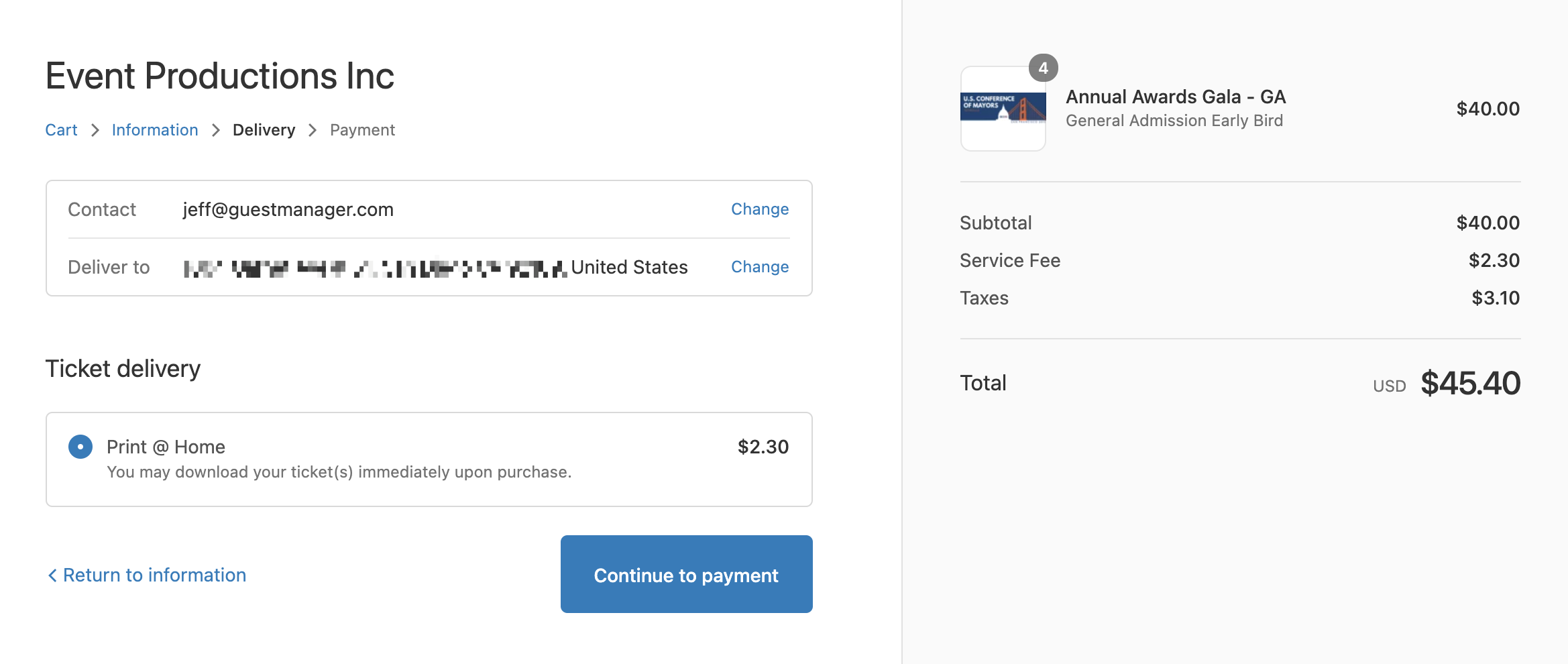
<p>With Shopify’s <a href="https://help.shopify.com/en/manual/shipping/setting-up-and-managing-your-shipping/enabling-shipping-carriers">Custom Carrier Rate Service</a>, you are now able to collect service fees for your tickets cleanly and reliably within the Shopify platform!</p>

<p>Learn more: <a href="/docs/shopify/booking-fees">How to collect your own booking and service fees</a></p>

<h3 id="update-to-cookieless-app-bridge-authentication">Update to Cookieless App Bridge Authentication</h3>

<p>Event Ticketing is committed to staying up to date with the latest and greatest tech from Shopify. With <a href="https://shopify.dev/changelog/cookieless-app-bridge-auth-beta-now-available">cookie less auth</a>, the app is now much faster, and more reliable when being used in the Shopify mobile app, and Safari.</p>

<h3 id="dkim-and-spf-email-sender-authentication">DKIM and SPF email sender authentication</h3>

<p>For Plus+ customers, we now offer the ability to authenticate your outgoing emails using DKIM and SPF. This improves email deliverability and maintains your own branded from address. Please contact support to get this feature added to your Plus+ Subscription!</p>

<h3 id="other-improvements">Other improvements</h3>

<ul>
  <li>A reply to field has been added to the <strong>Ticket attachment email</strong>, so you can receive any customer questions directly from the email.</li>
  <li>Improved iOS check in app to better handle multi-date and time slot events. The interface is now much simpler, allowing you to scan and check in for all events without having to navigate back and forth between events/dates.</li>
  <li>Dozens of bug fixes and performance improvements. Happy to report there are now no known bugs!</li>
  <li>All products are now created by default in DRAFT status, and the Online store sales channel is pre-selected. To make your product available, simply set the status to ‘Active’ in Shopify. And, if necessary, add more sales channels (such as POS).</li>
</ul>]]></content><author><name>Jeff Blake</name></author><category term="product" /><category term="shopify" /><summary type="html"><![CDATA[It’s been awhile since the last update, but believe me, things are happening! The past month or so has been devoted to improving app reliability and performance for our largest Shopify Plus customers. It’s with great satisfaction to report the app is more reliable and fast than ever. With those improvements out of the way, it’s time for some new features:]]></summary></entry><entry><title type="html">More customization options for the PDF ticket and collecting attendee info</title><link href="https://www.guestmanager.com/blog/product/2020/10/21/app-updates" rel="alternate" type="text/html" title="More customization options for the PDF ticket and collecting attendee info" /><published>2020-10-21T00:20:00+00:00</published><updated>2020-10-21T00:20:00+00:00</updated><id>https://www.guestmanager.com/blog/product/2020/10/21/app-updates</id><content type="html" xml:base="https://www.guestmanager.com/blog/product/2020/10/21/app-updates"><![CDATA[<h3 id="improvements-to-collecting-attendee-data">Improvements to collecting attendee data</h3>

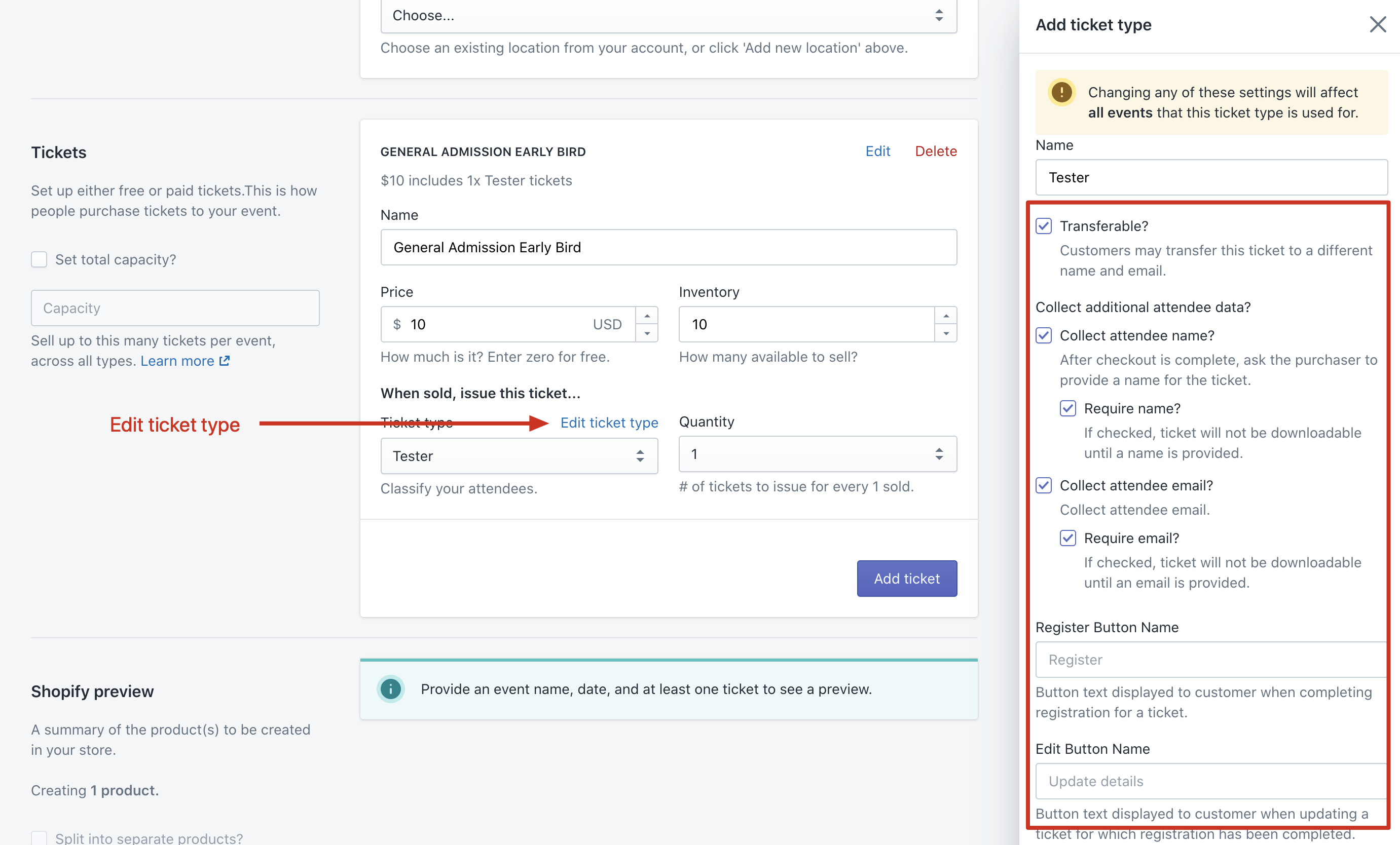
<p>Some Guest Manager features related to collecting attendee name, email, etc have made their way into the Shopify app and can be configured directly on the Ticket Type. If you want to collect other custom fields, that is still done in Guest Manager for now. Please see help article here on <a href="/docs/shopify/collecting-attendee-information">Collecting attendee information</a>.</p>

<p><img src="/assets/images/blog/image-20201020142449586.png" alt="image-20201020142449586" /></p>

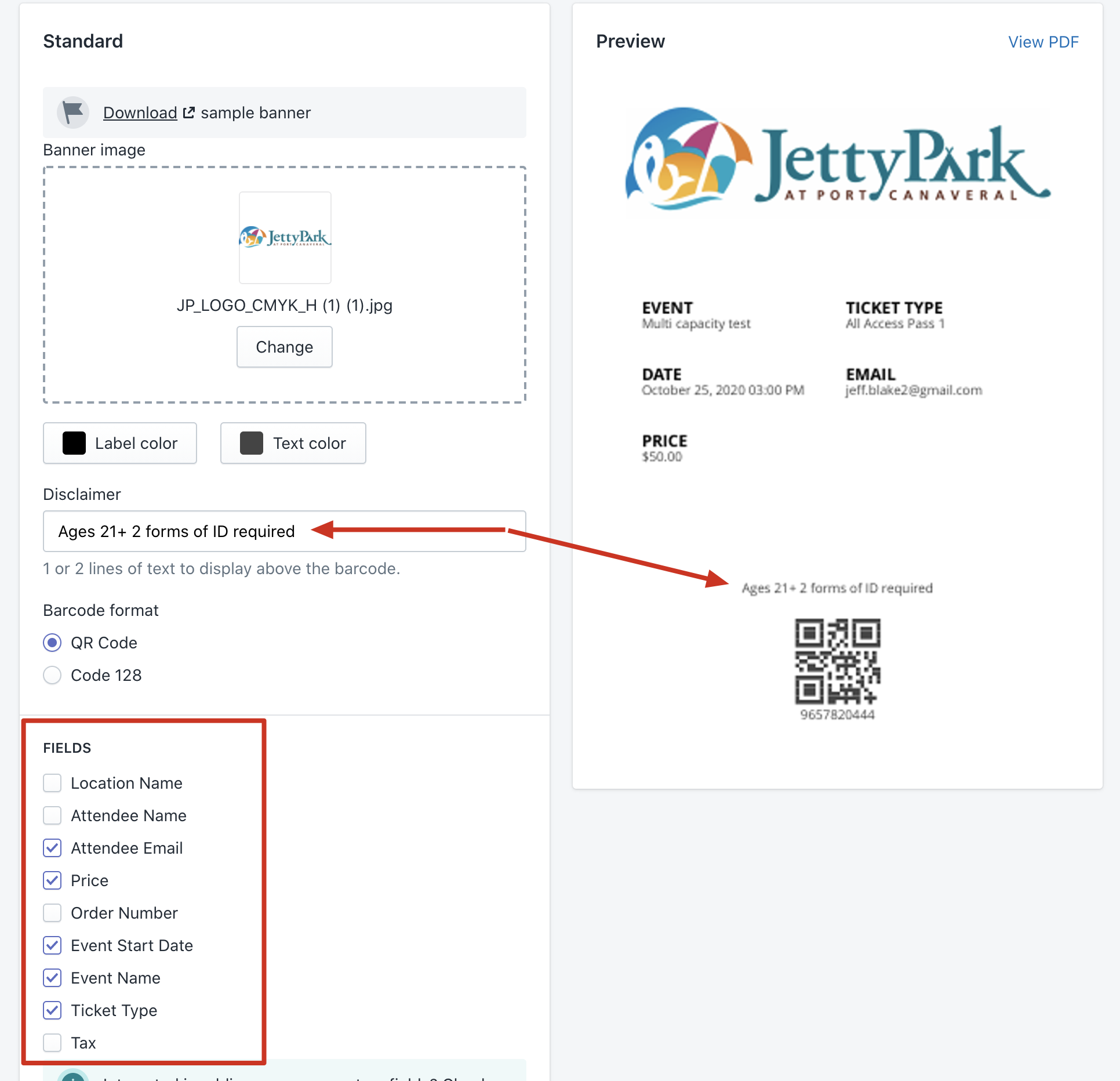
<h3 id="more-customization-settings-for-the-pdf-ticket-design">More customization settings for the PDF ticket design</h3>

<p>You can now hide/show certain fields as well as add a blurb of text to show above the barcode (good for Terms/conditions, age restrictions, etc).</p>

<p><img src="/assets/images/blog/image-20201021101120086.png" alt="image-20201021101120086" /></p>]]></content><author><name>Jeff Blake</name></author><category term="product" /><category term="shopify" /><summary type="html"><![CDATA[Improvements to collecting attendee data]]></summary></entry><entry><title type="html">New Check In App Interface!</title><link href="https://www.guestmanager.com/blog/product/2020/10/18/app-updates" rel="alternate" type="text/html" title="New Check In App Interface!" /><published>2020-10-18T10:20:00+00:00</published><updated>2020-10-18T10:20:00+00:00</updated><id>https://www.guestmanager.com/blog/product/2020/10/18/app-updates</id><content type="html" xml:base="https://www.guestmanager.com/blog/product/2020/10/18/app-updates"><![CDATA[<p>These past ~6 weeks have been primarily minor bug fixes and performance enhancements.</p>

<h4 id="new-check-in-app-version-31">New Check In App Version 3.1</h4>

<p>Major simplification of the user interface! Especial benefits for clients using time slots who need flexibility in being able to look up and scan for many time slots at once. Get the update in the iOS App Store! Mac app update coming soon.</p>

<p>See the app here: https://apps.apple.com/us/app/guest-manager-check-in/id1460267612</p>

<h3 id="improvements-and-changes">Improvements and changes</h3>

<ul>
  <li>Inventory sold through the POS when you “POS order processing” disabled will now be accounted for in Event Ticketing, so you don’t have to manage inventory yourself in an awkward way. Events using “Capacity” are also accounted for too!</li>
  <li>Inventory changes now sync faster to Shopify when editing a large event with many variants</li>
  <li>The limit of 15,000 inventory has now been removed, as ET now manages inventory internally in a simpler way.</li>
  <li>There is now a backup mechanism when loading tickets on the Order status page. If Shopify hasn’t sent their web hook within 15 seconds, the app will auto-fetch and process the order, so the customer is not left waiting.</li>
  <li>Updated Shopify Polaris to the latest version</li>
  <li>Option to display tax amount on the ticket</li>
  <li>Editing a multi-day event will hide past dates by default for ease of use</li>
  <li>Option to disable customer editing of custom ticket fields</li>
</ul>

<p>Not mentioned: dozens of minor bug fixes and performance improvements!</p>]]></content><author><name>Jeff Blake</name></author><category term="product" /><category term="shopify" /><summary type="html"><![CDATA[These past ~6 weeks have been primarily minor bug fixes and performance enhancements.]]></summary></entry><entry><title type="html">Emailing tickets as attachments (Shopify)</title><link href="https://www.guestmanager.com/blog/product/2020/09/01/shopify-ticket-attachment-email" rel="alternate" type="text/html" title="Emailing tickets as attachments (Shopify)" /><published>2020-09-01T10:20:00+00:00</published><updated>2020-09-01T10:20:00+00:00</updated><id>https://www.guestmanager.com/blog/product/2020/09/01/shopify-ticket-attachment-email</id><content type="html" xml:base="https://www.guestmanager.com/blog/product/2020/09/01/shopify-ticket-attachment-email"><![CDATA[<p>A new feature is available for <strong>Professional</strong> and <strong>Plus+</strong> customers: the ability to send tickets as attachments (PDF / Apple wallet) directly to the customer via email after purchase.</p>

<p>Learn more about the new feature here: <a href="/docs/shopify/ticket-attachment-email">Enabling the ticket attachment email (docs)</a></p>

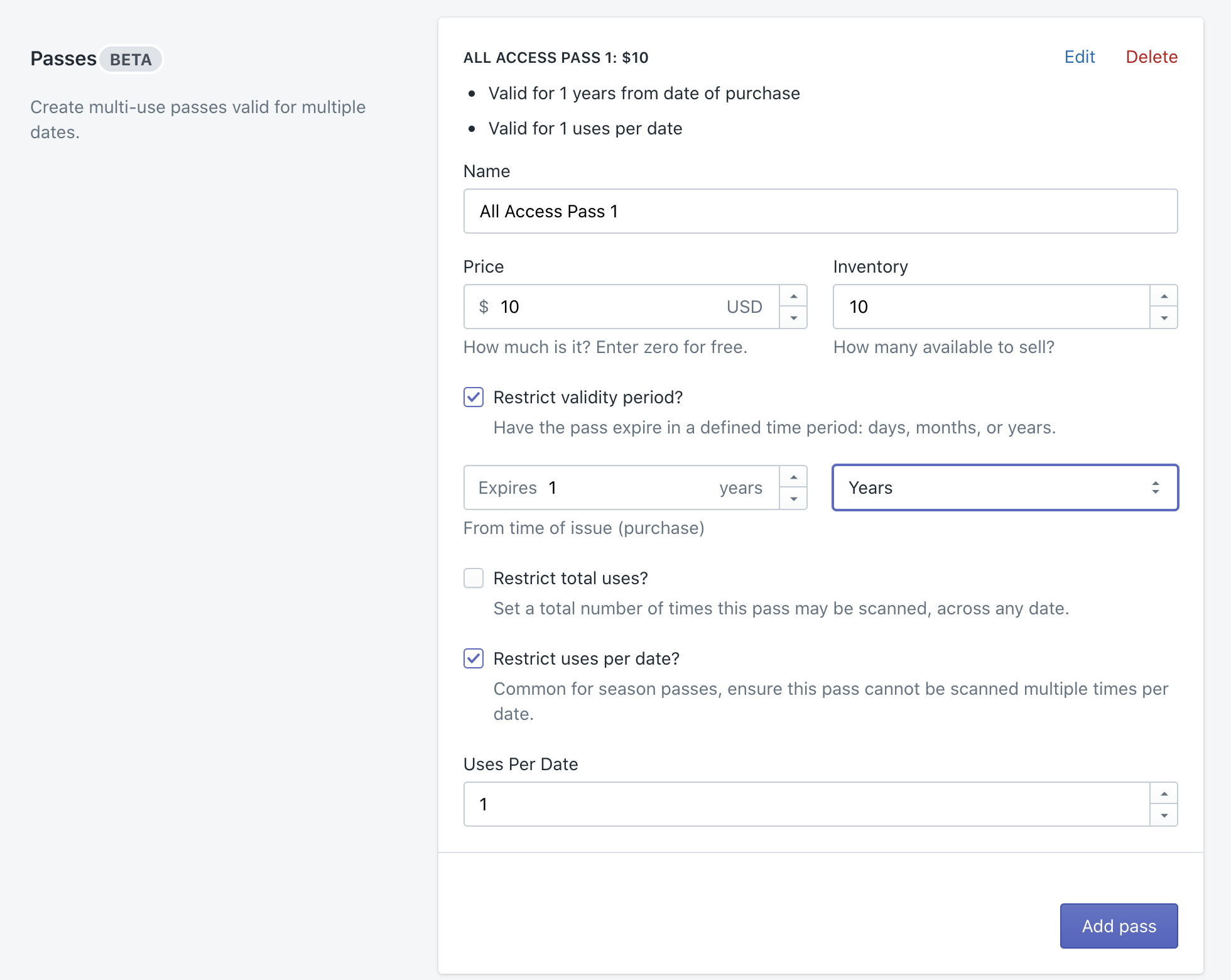
<p><img src="/assets/images/blog/Screen Shot 2020-09-01 at 3.57.13 PM.png" alt="Screen Shot 2020-09-01 at 3.57.13 PM" /></p>]]></content><author><name>Jeff Blake</name></author><category term="product" /><category term="shopify" /><summary type="html"><![CDATA[A new feature is available for Professional and Plus+ customers: the ability to send tickets as attachments (PDF / Apple wallet) directly to the customer via email after purchase.]]></summary></entry><entry><title type="html">Multi-use passes for Shopify</title><link href="https://www.guestmanager.com/blog/product/2020/08/27/shopify-passes" rel="alternate" type="text/html" title="Multi-use passes for Shopify" /><published>2020-08-27T10:20:00+00:00</published><updated>2020-08-27T10:20:00+00:00</updated><id>https://www.guestmanager.com/blog/product/2020/08/27/shopify-passes</id><content type="html" xml:base="https://www.guestmanager.com/blog/product/2020/08/27/shopify-passes"><![CDATA[<p>When setting up Multi-date events, you now have a new option to create Passes in addition to Tickets. Whereas Tickets are added as a purchasable option for each date that you add, passes are a separate product that can be used to grant access to multiple dates within an event. For example, this is useful for season passes, annual passes, single use pass (valid on any one date), etc.</p>

<p><img src="/assets/images/blog/Screen Shot 2020-08-31 at 11.17.42 AM.png" alt="Screen Shot 2020-08-31 at 11.17.42 AM" /></p>

<p>Other changes</p>

<ul>
  <li>If a single variant is to be created, it now makes it appear as a simple product, as opposed to a ‘product with 1 variant’</li>
  <li>Fixed bug where changing a one-off event name would not update the product title in Shopify</li>
  <li>The Guest Manager backend now has a new, more user friendly date picker, especially when picking times</li>
  <li>Fixed issue when attempting to empty a very large trash bin</li>
  <li>Fixed issue where tickets had the purchasers name pre-filled into it, allowing purchaser to download ticket without providing the actual attendee’s name</li>
  <li></li>
</ul>]]></content><author><name>Jeff Blake</name></author><category term="product" /><category term="shopify" /><summary type="html"><![CDATA[When setting up Multi-date events, you now have a new option to create Passes in addition to Tickets. Whereas Tickets are added as a purchasable option for each date that you add, passes are a separate product that can be used to grant access to multiple dates within an event. For example, this is useful for season passes, annual passes, single use pass (valid on any one date), etc.]]></summary></entry><entry><title type="html">Duplicate event and POS feature</title><link href="https://www.guestmanager.com/blog/product/2020/08/10/shopify-pos-duplicate" rel="alternate" type="text/html" title="Duplicate event and POS feature" /><published>2020-08-10T10:20:00+00:00</published><updated>2020-08-10T10:20:00+00:00</updated><id>https://www.guestmanager.com/blog/product/2020/08/10/shopify-pos-duplicate</id><content type="html" xml:base="https://www.guestmanager.com/blog/product/2020/08/10/shopify-pos-duplicate"><![CDATA[<p>Over the past month the app has received a lot of refinements not really worthy for a post! Today announcing two new features.</p>

<h3 id="duplicate-events">Duplicate events</h3>

<p>A highly requested feature has been the option to duplicate an event. I’m happy to announce it is now possible! Click on an event, and below the title, next to the “Customize”, “Manage in Backend” buttons, there is now a “Duplicate” button.</p>

<h3 id="disable-processing-of-point-of-sale-orders">Disable processing of point of sale orders</h3>

<p>Some merchants who use Point of sale but do not need ticketing features, now have the option to disable processing tickets for POS orders. This means that no tickets are generated (because you likely let the customer in right away), and <strong>you are not charged any fees!</strong></p>]]></content><author><name>Jeff Blake</name></author><category term="product" /><category term="shopify" /><summary type="html"><![CDATA[Over the past month the app has received a lot of refinements not really worthy for a post! Today announcing two new features.]]></summary></entry><entry><title type="html">Small update</title><link href="https://www.guestmanager.com/blog/product/2020/07/08/shopify-app" rel="alternate" type="text/html" title="Small update" /><published>2020-07-08T10:20:00+00:00</published><updated>2020-07-08T10:20:00+00:00</updated><id>https://www.guestmanager.com/blog/product/2020/07/08/shopify-app</id><content type="html" xml:base="https://www.guestmanager.com/blog/product/2020/07/08/shopify-app"><![CDATA[<h3 id="collecting-custom-fields">Collecting custom fields</h3>

<ul>
  <li>Added option to include a photo upload when completing registration for a ticket. Useful for season passes, etc. This photo will also display on the scanner when the pass is scanned.</li>
</ul>

<p><a href="/docs/event-setup/custom-fields">View the how-to article on how to collect attendee information post-purchase</a> such as <strong>Name, Email, and Photo</strong>. Also consider using the <strong>Ticket transfer</strong> feature.</p>

<h3 id="minor-changes">Minor changes</h3>

<ul>
  <li>Fixed issue editing an Order in Shopify: Now supports removing line items where the variant was previously deleted.</li>
  <li>Added column in Attendees for “Sessions”. This is the number of dates (events) that the attendee is registered for. Useful for tracking season pass redemptions, conference sessions, etc</li>
</ul>]]></content><author><name>Jeff Blake</name></author><category term="product" /><category term="shopify" /><summary type="html"><![CDATA[Collecting custom fields]]></summary></entry><entry><title type="html">Shopify app polishes</title><link href="https://www.guestmanager.com/blog/product/2020/07/01/shopify-app-polishes" rel="alternate" type="text/html" title="Shopify app polishes" /><published>2020-07-01T10:20:00+00:00</published><updated>2020-07-01T10:20:00+00:00</updated><id>https://www.guestmanager.com/blog/product/2020/07/01/shopify-app-polishes</id><content type="html" xml:base="https://www.guestmanager.com/blog/product/2020/07/01/shopify-app-polishes"><![CDATA[<p>Small release to tidy up a few things!</p>

<ul>
  <li>The new <strong>event capacity</strong> setting now takes group tickets into account. For example, if you sell 1 group ticket of 5, Shopify will only reduce inventory by 1. The app will automatically reduce it a further 4 units, as well as reduce all other variants of the event by 5.</li>
  <li>Improved the ticket transfer process</li>
  <li>Added German localizations for ticket transfer, emails, buttons, etc</li>
  <li>Tickets are no longer downloadable (buttons are hidden) if you have configured required fields (ticket custom fields, name, email, form questions, etc)</li>
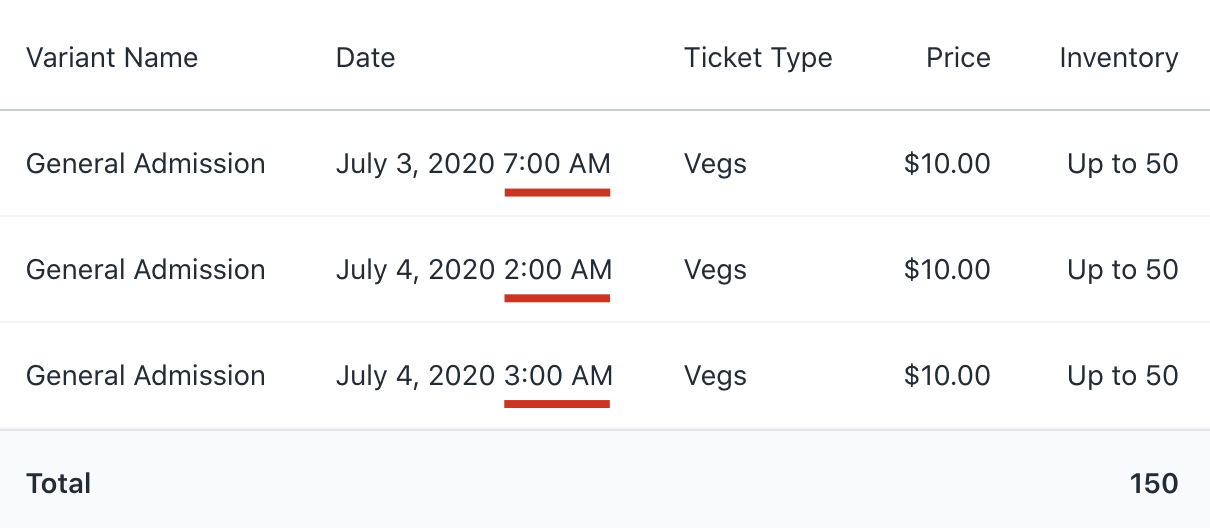
</ul>]]></content><author><name>Jeff Blake</name></author><category term="product" /><category term="shopify" /><summary type="html"><![CDATA[Small release to tidy up a few things!]]></summary></entry><entry><title type="html">Event editing improvements</title><link href="https://www.guestmanager.com/blog/product/2020/06/28/shopify-event-editing-improvements" rel="alternate" type="text/html" title="Event editing improvements" /><published>2020-06-28T10:20:00+00:00</published><updated>2020-06-28T10:20:00+00:00</updated><id>https://www.guestmanager.com/blog/product/2020/06/28/shopify-event-editing-improvements</id><content type="html" xml:base="https://www.guestmanager.com/blog/product/2020/06/28/shopify-event-editing-improvements"><![CDATA[<h3 id="event-previews-and-sales-overview-now-displays-the-time">Event previews and sales overview now displays the time</h3>

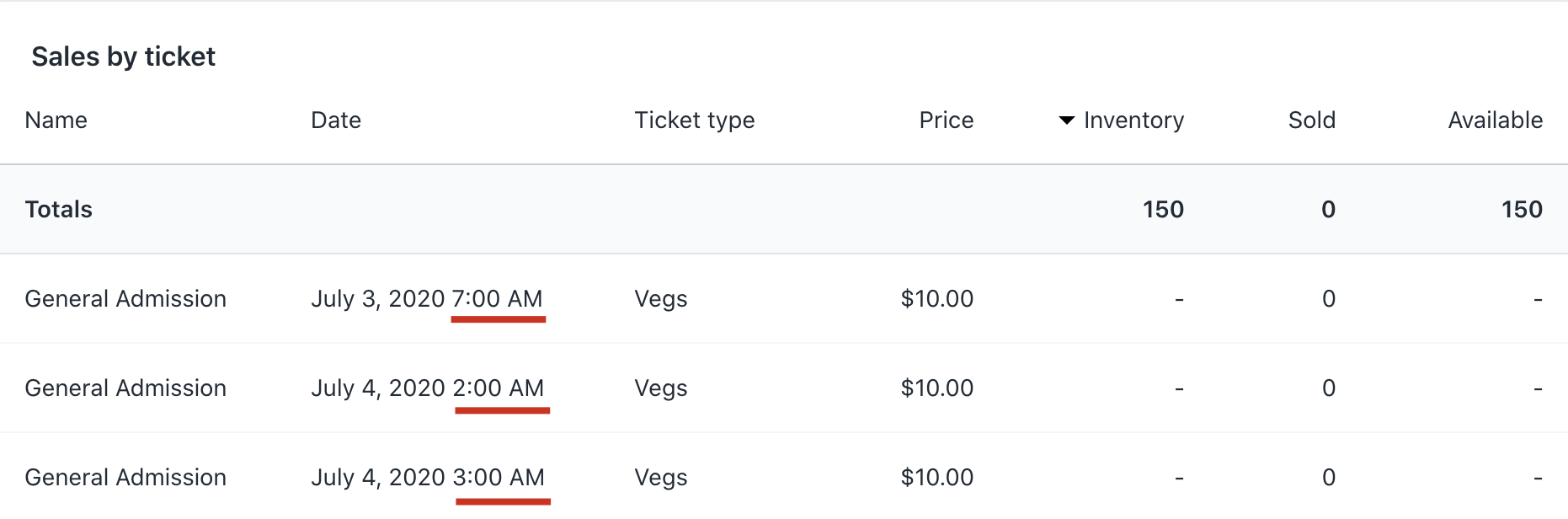
<p>If you set up multiple times on the same day, the preview and sales overview now displays the time:</p>

<div class="row">
  <div class="col">
    <img src="/assets/images/blog/image-20200628133134837.png" alt="shopify event ticketing" />

​    


  </div>
  <div class="col">
    <img src="/assets/images/blog/image-20200628133351516.png" alt="shopify event ticket sales" />

  </div>
</div>

<p>If all dates occur on different days, then only the date is shown.</p>

<h3 id="set-up-dates-and-time-slots-more-quickly">Set up dates and time slots more quickly</h3>

<p>The user experience of creating multiple dates has been improved.</p>

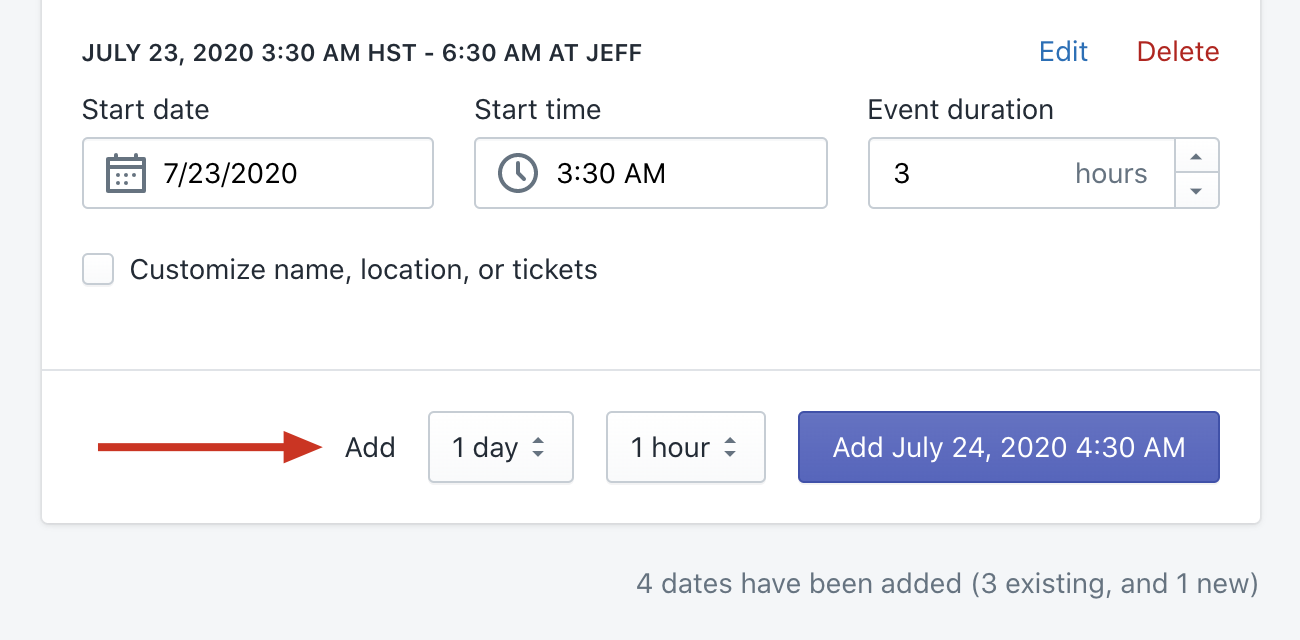
<p>Often you need to add multiple dates in the same interval, such as every hour, or every day. Set the day and hour dropdown to your preference, and click add date!</p>

<p><img src="/assets/images/blog/image-20200628122936931.png" alt="image-20200628122936931" /></p>

<ul>
  <li>Can paste a time in to the <strong>Start time</strong> field</li>
  <li>Can paste a date in to the <strong>Start date</strong> field</li>
  <li>Duration is preset to the last used Duration</li>
  <li>Summary at the bottom tells you how many total, new, and existing dates have been set up.</li>
</ul>

<p>I hope these enhancements save you a few seconds!</p>

<h3 id="other-improvements">Other improvements</h3>

<ul>
  <li>Added a <strong>Transferable?</strong> Checkbox when adding or editing ticket types</li>
  <li>New orders/tickets are now synced in realtime to the iOS App (previously you would have to trigger a sync)</li>
</ul>]]></content><author><name>Jeff Blake</name></author><category term="product" /><category term="shopify" /><summary type="html"><![CDATA[Event previews and sales overview now displays the time]]></summary></entry></feed>